
You might remember that some years ago, I found a discarded organ and brought it home. Well, it sat around for a year, then I converted it to MIDI, then I moved across the country and only brought the keyboards, and finally I re-built it as the proper single-row unit featured in the above video.
The keys are laid out as a generic matrix-style keyboard, with a column for every note in an octave (12 in total), and a row for each octave bank (up to ten, although only 8 are in use). Using a Barebones Arduino clone and a couple of I/O expander chips (PCF854AN) for extra digital pins, I was able to convert the old keyboard into a MIDI device. This version works fine, however the circuit is a bit extravagant- If I ever re-build it, I will use a 3-to-8 line decoder for the select lines, which should free up enough digital pins on the Arduino to be able to get rid of the I/O expander chips. Really, though, I would prefer to convert it into a velocity sensitive keyboard, so any further effort will be in that direction. Rough schematic and source code after the break.
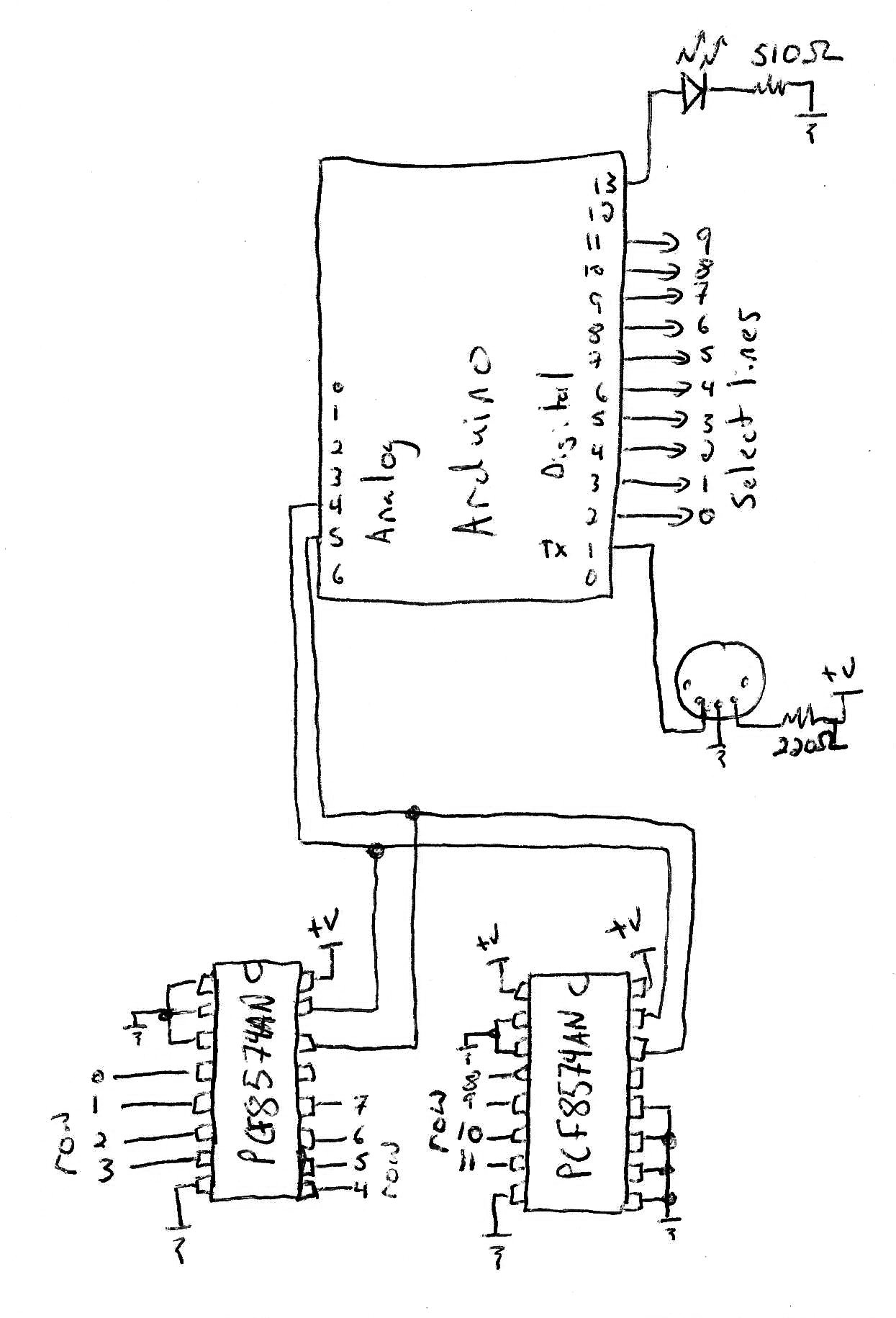
// Sketch to convert an older electric organ (Eminent S20) into a MIDI instrument. // By Matt Mets, completed in 2009 // // This code is released into the public domain. Attribution is appreciated. // // MIDI source code from the ITP website: // http://itp.nyu.edu/physcomp/Labs/MIDIOutput #include <Wire.h> #define LEDpin 13 // Just the standard output LED #define volumePedal 1 // The analog input for the volume control char velocity; // Use the foot pedal to determine this // Define the MIDI channels that each instrument transmits on #define keyboardChannel 0 // Number of key banks to scan. There are eight 'normal' key banks, and 2 special ones. #define numKeyBanks 8 #define numKeysPerBank 12 // Lookup table, used to determine the select line to turn on to read the keys in that key bank. static char keyBankSelectLines[] = {2,3,4,5,6,7,8,11}; // Storage for the previous value of each bank of keys. There are 10 access lines, with a maximum of 12 inputs per line. // The 12 bits of data on each line are split into low and high banks. unsigned char noteStatesL[numKeyBanks]; unsigned char noteStatesH[numKeyBanks]; // Storage for the instrument data associated with each key. Must be filled in at startup. unsigned char noteChannels[numKeyBanks][numKeysPerBank]; unsigned char noteValues[numKeyBanks][numKeysPerBank]; // Initialize IO ports void setup() { // Setup the I2C bus (analog pins 4&5) in master mode. This bus is used to talk to the IO expander chips. Wire.begin(); // Set the serial port to the correct baud rate for MIDI Serial.begin(31250); // Set all initial note bank vales to 0 for (unsigned int i = 0; i < numKeyBanks; i++) { noteStatesL[i] = 0; noteStatesH[i] = 0; } pinMode(LEDpin, OUTPUT); // Status LED // Set all of the bank select lines to outputs for (unsigned char bankNo = 0; bankNo < numKeyBanks; bankNo++) { pinMode(keyBankSelectLines[bankNo], OUTPUT); } // Set up the instrument data for the keys // first off, clear everything. for (unsigned char bank = 0; bank < numKeyBanks; bank ++) { for (unsigned char key = 0; key < numKeysPerBank; key++) { noteChannels[bank][key] = 0; noteValues[bank][key] = 0; } } // The bottom half of the keyboard comprised of banks 4-6, starting at F unsigned char noteValue = 24; // Octave 2, C note for (unsigned char bank = 4; bank < 7; bank ++) { for (unsigned char key = 0; key < 12; key++) { noteChannels[bank][key] = keyboardChannel; noteValues[bank][key] = noteValue++; } } // The top keyboard row is comprised of banks 0-3, starting at F for (unsigned char bank = 0; bank < 4; bank ++) { for (unsigned char key = 0; key < 12; key++) { noteChannels[bank][key] = keyboardChannel; noteValues[bank][key] = noteValue++; } } // And one extra one on bank 9 note 1 noteChannels[7][1] = keyboardChannel; noteValues[7][1] = noteValue++; } // Send a MIDI command. // cmd is the command and channel (0x90 for channel 1 note on) // data1 is the note // data2 is the velocity void midiCommand(char cmd, char data1, char data2) { Serial.print(cmd, BYTE); Serial.print(data1, BYTE); Serial.print(data2, BYTE); } // Map an integer into a charater given a set range unsigned char mapInteger(int input, int min, int max) { return (((input - min)*255)/(max-min)); } // Main loop unsigned char newNoteStateL; unsigned char newNoteStateH; void loop() { // Read the velocity in // velocity = mapInteger(analogRead(volumePedal),400,900); velocity = 90; for (char bankNo = 0; bankNo < numKeyBanks; bankNo++) { digitalWrite(keyBankSelectLines[bankNo], HIGH); // Select the key bank Wire.requestFrom(0x38, 1); // Read the low data while (Wire.available()) { newNoteStateL = Wire.receive(); } Wire.requestFrom(0x39, 1); // Read the high data while (Wire.available()) { newNoteStateH = Wire.receive(); } digitalWrite(keyBankSelectLines[bankNo], LOW); // Deselect the key bank if (newNoteStateL != noteStatesL[bankNo]) { // Check if any notes in this bank are different char stateDelta = newNoteStateL ^ noteStatesL[bankNo]; for (unsigned char i = 0; i < 8; i++) { if ((stateDelta >> i) & 1) { if ((newNoteStateL >> i) & 1) { // Send a MIDI on message midiCommand(0x90 + noteChannels[bankNo][i], noteValues[bankNo][i], velocity); } else { // Send a MIDI off message midiCommand(0x80 + noteChannels[bankNo][i], noteValues[bankNo][i], velocity); } } } } if (newNoteStateH != noteStatesH[bankNo]) { // Check if any notes in this bank are different digitalWrite(LEDpin, HIGH); char stateDelta = newNoteStateH ^ noteStatesH[bankNo]; for (unsigned char i = 0; i < 8; i++) { if ((stateDelta >> i) & 1) { if ((newNoteStateH >> i) & 1) { // Send a MIDI on message midiCommand(0x90 + noteChannels[bankNo][i+8], noteValues[bankNo][i+8], velocity); } else { // Send a MIDI off message midiCommand(0x80 + noteChannels[bankNo][i+8], noteValues[bankNo][i+8], velocity); } } } } noteStatesL[bankNo] = newNoteStateL; noteStatesH[bankNo] = newNoteStateH; } } |
That is really cool! I haven’t heard of these Arduino clone boards before. I was always under the impression that if I wanted to write embedded code I had to buy expensive PIC stuff.
Do you get everything required (not including your external circuitry of course) with that barebones kit? It’s impressively cheap!!! I hope I can get them in New Zealand =)
I’m gonna be writing some Linux games to run at my kids’ playcentre and kindergarten, and I love the idea of making a real cheap MIDI keyboard to make a musical game. Thank you for your post. It’s exactly what I was hunting for.
Hi Paddy! Thanks!
Sorry for the late reply. The barebones kit comes with just the parts to put together the board. I had to add a breadboard, keyboard electronics, and (most importantly) a usb-to-serial cable to get it to talk to the computer.
The barebonesboard worked well for me since I had it connected to an actual MIDI device. If you are going to have it permanently attached to a computer, you’ll need a way to get the MIDI data into the computer. I’d recommend getting a board with a built-in USB converter, so that you can connect to it using usb. Here are a couple i’ve used, one from seeed studio:
http://www.nkcelectronics.com/seeeduino-fully-assembled–arduino-compatible.html
Or maybe, if you want to put it together, the freeduino:
http://www.nkcelectronics.com/freeduino-arduino-diecimila-compatible-board-complete-kit.html
Of course, the regular Arduino is only around ~30, so you don’t save much using these ones :-(.
Nice job! I wonder if my project would need the I/O expander chips. I have an Arduino Uno board and some organ bass pedals I want to turn into MIDI pedals so I can trigger sounds while I play my guitar or bass. Any suggestions?
Thanks,
Terry
Hi Terry- You won’t need the I/O inputs if you don’t have too many things you want to monitor. The Uno has 13 digital input pins (one of which is used for midi out), plus 6 analog ones that can also be used for input, so you could hook up 18 different inputs without needed an expander.
Hi there! First , congrats for the project!
Im starting to build one from an old broken organ, and would like to know if it’d be possible to serial out from arduino into a pc usb virtual midi using arduino uno’s usb interface instead of real midi out interface on pin 13.
My intention is to hook up the organ into my pc via usb (pc has no midi interface), and then i’ll control virtual instruments via organ keys.
It’s possible to do with an Arduino UNO or Mega 2560:
http://arduino.cc/en/Hacking/MidiWith8U2Firmware
However, it might be easier to find a cheapo USB to MIDI converter instead. Something like this might work:
http://www.amazon.com/Cable-Converter-Music-Keyboard-Window/dp/B0017H4EBG
You can also use the USB on the Arduino as a regular serial port, and run a program on your PC that converts it to MIDI, but that usually ends up being a pain.
Good luck!!
Nice job bro !!!!!! I have a question ,as i hope that you can help me. I am doing the same idea on an eaton moog multi touch keyboard, trying to make the sound come out from the computer .will your program for the ardunio will work with us?!
thanks
Hi mahto
very nice project, i must to build a similary keyboard and i have only one question:
can you post the matrix schematics of keyboard ? you have write row in pcf8574 and line into arduino pin, but how is the real schematics of line and row ?
Many thanks for help
Mirco
Hi Bro, i have build that but it’s not work, i have an error with wire library (i have modify the receive with read) but this command don’t read anything in input. Why ? could you help me please ? i’m using arduino UNO.
Thanks Cheers
Mirco
First of all you did an awesome job! Not easy to find a good keyboard midi conversion tutorial. I was just wondering how much you think it would cost for me to convert a 61-key keyboard and a 32-note pedalboard? And what supplies would i need to get in order to do that?
Thanks!